
Snyder County Wanted Records
Warrants in Snyder County work differently than recent arrests. The sheriff's warrant information page describes how the office manages criminal, civil, and Domestic Relations warrants from the Court of Common Pleas. Names stay off that page on purpose. Privacy and identity theft are real worries. For actual records, the public route is the portal itself.
The official Snyder County warrant portal carries the live data. Expect a mix of old and new issue dates in one view. Rows shift after service or other court action. Treat the tool as a search aid, not a custody tracker or a most-wanted gallery. Start with the sheriff's page when the table leaves questions open.
The captured view below comes from the official Snyder County warrant portal, which shows filters and a table rather than photos.
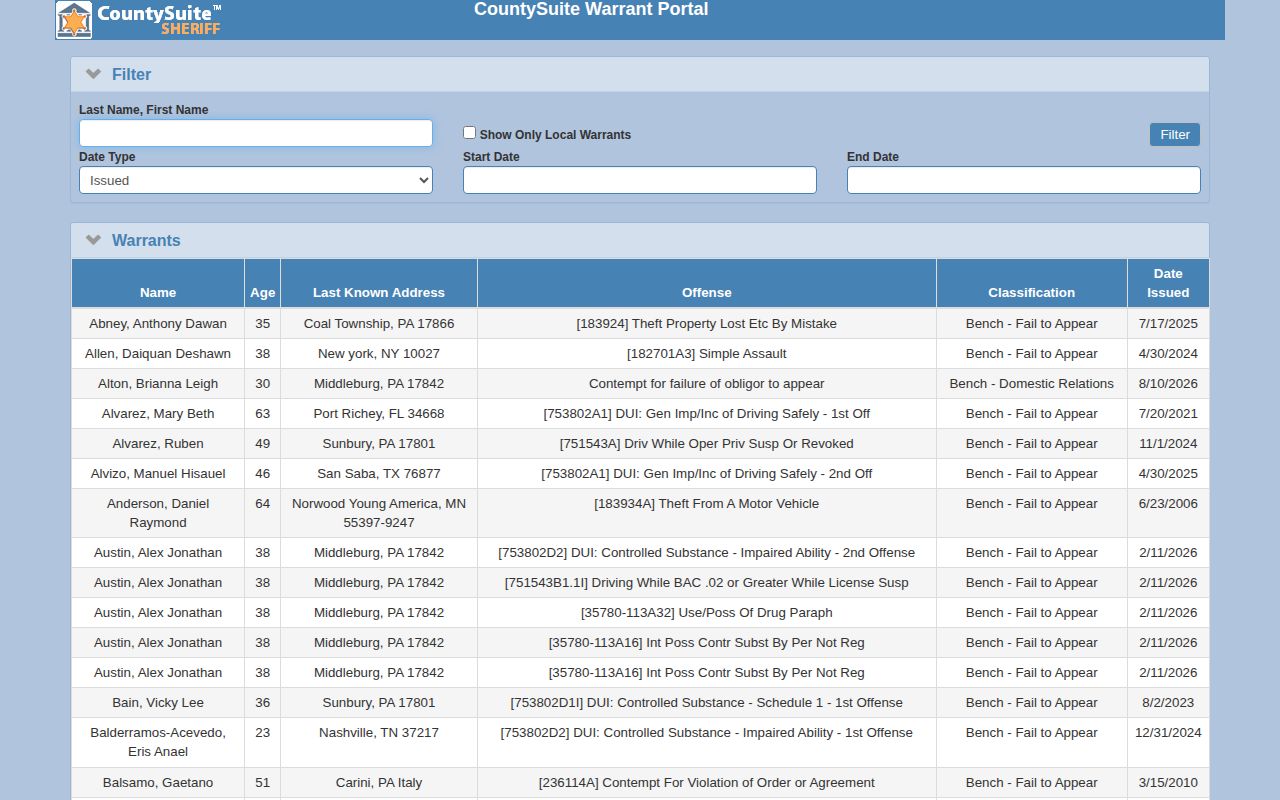
The layout suits a targeted lookup. Just note that dates here are warrant issue dates, not booking times or recent-arrest timestamps.
Snyder County Warrant Fields
Each field in the portal helps separate one result from a person with a similar name, though every column has its limits. A last known address is just that: last known. The offense label reflects the warrant basis. Classification marks the portal's own sorting, and the issue date tells you when the warrant was signed, not when the underlying incident occurred or when anyone was booked.
| Portal field | What it identifies |
|---|---|
| Name | The name displayed in the warrant record. |
| Age | An identifying detail shown with the portal row. |
| Last known address | A historical contact detail, not a statement of current whereabouts. |
| Offense | The alleged offense or warrant basis listed by the portal. |
| Classification | The warrant category displayed in the official table. |
| Date issued | The warrant's issue date, not an arrest or booking date. |
Treat these fields as a starting point for a court question, not material to republish about a person. Records can linger until the portal updates. Older issue dates stay visible for a while. A shared name proves little on its own, so confirm identity and current warrant status through official channels.
Use Snyder Warrant Filters
The warrant portal gives you several ways to slice a search. Enter a first name, a last name, or both. Switch to a local-warrants view, pick a date type, and set a date range that fits. Filters like these narrow things down fast. They cannot turn the portal into a full arrest roster, though. Snyder County does not publish an official booking feed for the public. Someone freshly booked, someone held briefly, someone moved to another facility, and someone already sentenced to state custody each sit in a different place in the records system. Each stage points you to a different source.
- Open the official portal and enter the last name, then add a first name when it is known.
- Select the local-warrants filter only when the inquiry concerns Snyder County rather than a broader result set.
- Choose a date type and range only to review warrant issue information, not to infer a recent booking window.
- Read the displayed name, age, offense, classification, and date together before seeking official court confirmation.
A blank search screen tells you less than you might think. Misspelled names, lagging portal updates, sealed files, and out-of-county warrants can all hide a record. So dig deeper. The sheriff's office answers warrant questions directly, and the UJS docket system covers the court side of things. Together those two official channels catch what the filters miss.
Note: Filters can point you to a warrant, but only the issuing court or the sheriff can confirm where it stands today.
Snyder County Warrant Matching
A familiar name in the portal is a starting point, not an identification. Age, last known address, offense, classification, and issue date help you sort one record from another. Each field has limits, though. Addresses go stale. Descriptions change. Read every field together before you treat a row as the person you had in mind.
Before matching a portal result to a docket, check that the details line up. Name, county, date, docket number, and issuing court should all agree. When something conflicts, stop and ask the sheriff, the court, or a lawyer. People share names more often than you would guess, and merging two strangers into one record is an easy mistake with lasting consequences. Resist the urge to guess where someone lives now or to post claims about their case. Timing adds wrinkles too, since a warrant can predate an arrest, outlast a missed court date, or be resolved while the display still shows it active.
The data serves one narrow job. It points you toward the right agency or courtroom question. It will not tally recent arrests, count who is in custody, or settle what a judge must decide.
Snyder County Warrant Check
Want to check your own name for a warrant? The sheriff points people to the Pennsylvania UJS portal, the state's court lookup. Search there by docket number, subject name, or date of birth to reach Magisterial District Judge warrant details. The portal covers case files too: hearing history, charge text, and current status where the public can view them. It works differently than the sheriff's own warrant table. Keep that distinction in mind. And if a search comes back empty, hold off on conclusions, since a name mismatch, a timing gap, or an access limit can all hide a result.
- Search the sheriff portal by name and record the visible case clues without sharing the result publicly.
- Check UJS using the supported identifying information and review the docket for court status.
- If the result appears to concern the person searching, contact an attorney or the issuing court for verified instructions.
- Use the sheriff’s office for official routing or clarification, not a residence visit or an informal confrontation.
Sorting out a warrant is a job for a lawyer and the court. If you believe a warrant in your name is wrong, don't rely on a search. The sheriff says to go straight to an attorney or the bench. A public search result carries no legal weight. It can't replace advice from counsel, a judge's order, or confirmation from the office itself.
Snyder County Warrant Types
Within its Court of Common Pleas work, the sheriff recognizes three warrant classifications. The labels show what kinds of process the office handles. That's all they show. Classification alone says nothing about the facts of a case. It won't tell you whether a warrant was served or how a court will rule. For those answers, pull the docket or contact the responsible office.
| Classification | Official Snyder County context |
|---|---|
| Criminal | A warrant category handled by the sheriff from the Court of Common Pleas. |
| Civil | A separate warrant category listed by the sheriff. |
| Domestic Relations | A separate warrant category listed by the sheriff. |
Stick to the sheriff's published categories. Resist reading more into them. The labels don't support conclusions about conduct, family situations, or bail. They won't predict where a case ends up either. The disposition on the court record is what settles how a matter was resolved.
Snyder County Warrant Safety
Spotted someone on the wanted list? Take it to law enforcement. The sheriff accepts anonymous tips by phone, email, or a message to its official Facebook account. One caution about social media: posts get pulled or changed without warning. Treat a Facebook notice as a heads-up rather than a lasting record. For current safety instructions and tip routing, the sheriff's official warrant page is the stronger source.
Snyder County Sheriff’s Office
9 West Market Street
P.O. Box 217
Middleburg, PA 17842
(570) 837-3311
Rely on the office and its official warrant information for tip options, routing, and current contact details.
A warrant entry can be incomplete or out of date. It won't tell you where a person is or what happened after the listing. When you call in a tip, stick to the source and what you actually observed. Leave out private details and guesswork.
Snyder County Custody Alerts
The Snyder Sheriff has no official mobile app for booking photos. Pennsylvania does offer a different tool. The PA SAVIN and VINELink service covers county jails, state prisons, and parole. Sign up for release, escape, or movement notices by phone, text, email, or app. Know its limits, though. It is not a warrant service, a booking-photo source, or a full local roster.
Custody status can shift fast after a warrant is served. An arrest may pass through county booking, and the person can land in another facility. The state DOC locator only helps after a state sentence, not while a local warrant is active. To sort out booking records and custody sources, the Snyder County record search points you to a verified official record.
Snyder County Court Status
A warrant record and a criminal case are not the same thing. Snyder County sits in the 17th Judicial District. Magisterial District Judge proceedings there can include arraignments, preliminary hearings, complaints, and search warrants. After that point, a charge may be dismissed, waived, held for court, or stay pending. That journey explains why a portal row and a court docket often show different dates or wording.
Follow the official court docket for the real outcome. Choose status words with care. Use pending, dismissed, guilty, or sentenced only when the record backs them up. The court file, not a wanted-list entry, is where a legal result gets confirmed.
Note: A court disposition gives a case's outcome, while a warrant entry only marks an unresolved or historical process record.